When "Sold Out" Should Become "Preorder" on Shopify
Sold Out Is Not Always Final
Imagine this happens at 9:40 PM.
A creator posts a video featuring one of your products.
Traffic starts climbing.
Orders arrive faster than expected.
Then inventory reaches zero.
The product page changes to Sold Out while interested shoppers are still arriving.
That is the right message when you genuinely cannot promise more inventory.
But what if another 500 units are already confirmed with your supplier and expected in three weeks?
In that situation, Sold Out may not be the only option.
A carefully managed preorder can let customers reserve the product while giving the merchant better visibility into real demand.
The important word is carefully.
A preorder should not mean selling forever after inventory reaches zero. It should mean accepting only the orders you can responsibly promise.
What a Preorder Really Means
A Shopify preorder allows a customer to place an order for a product before it is ready for normal fulfillment.
This can make sense when:
- A temporary stockout has confirmed replacement inventory
- A new product has a known future launch date
- Incoming inventory is available in a defined quantity
- Demand is stronger than current stock can support
- The merchant can give customers a realistic timeline
The value is not simply keeping a purchase button active.
The value is giving customers an honest way to buy now while making it clear that fulfillment will happen later.
That distinction matters.
A customer should never have to discover after payment that the product they thought was in stock will actually ship four weeks later.
Set a Real Preorder Limit
Suppose your supplier confirms that 300 units will arrive next month.
Your current inventory reaches zero.
If the store simply continues accepting orders with no limit, another 600 customers could purchase.
Now the merchant has promised twice as much inventory as expected.
A better setup looks like:
Current stock: 0
Confirmed incoming: 300
Maximum preorder quantity: 300
Expected shipping: 3-4 weeks
Even that may be too generous.
Imagine the incoming shipment is actually:
500 units
but:
80 units are already allocated to wholesale
and:
20 units are kept as a safety buffer.
The consumer preorder allocation becomes:
500 - 80 - 20 = 400 units
That is a much better limit than assuming every incoming unit is available for online preorders.
The calculation may also need to account for physical stores, expected defects, supplier uncertainty, replacements, or other allocations.
Preorder quantity should come from operational reality.
Know When Preorders Fit
Preorders work best when the merchant has enough confidence behind the promise.
Imagine a bestselling hoodie sells out and the supplier confirms:
400 units expected around September 15
There is existing demand, a defined quantity, and a reasonable timeline.
That creates a strong preorder situation.
Now compare that with a supplier saying:
"We should have more eventually. We are not sure when or how many."
That is much weaker.
In that situation, a waitlist or back-in-stock notification may be more appropriate.
A preorder is still a commitment.
The merchant should be able to answer two questions:
How many can we responsibly sell?
When can customers reasonably expect them?
If neither answer is clear, keeping the product sold out may be the better decision.
Build the Setup Through Chat
With Celirox Store Operator, a merchant can describe the desired preorder experience in plain English.
For example:
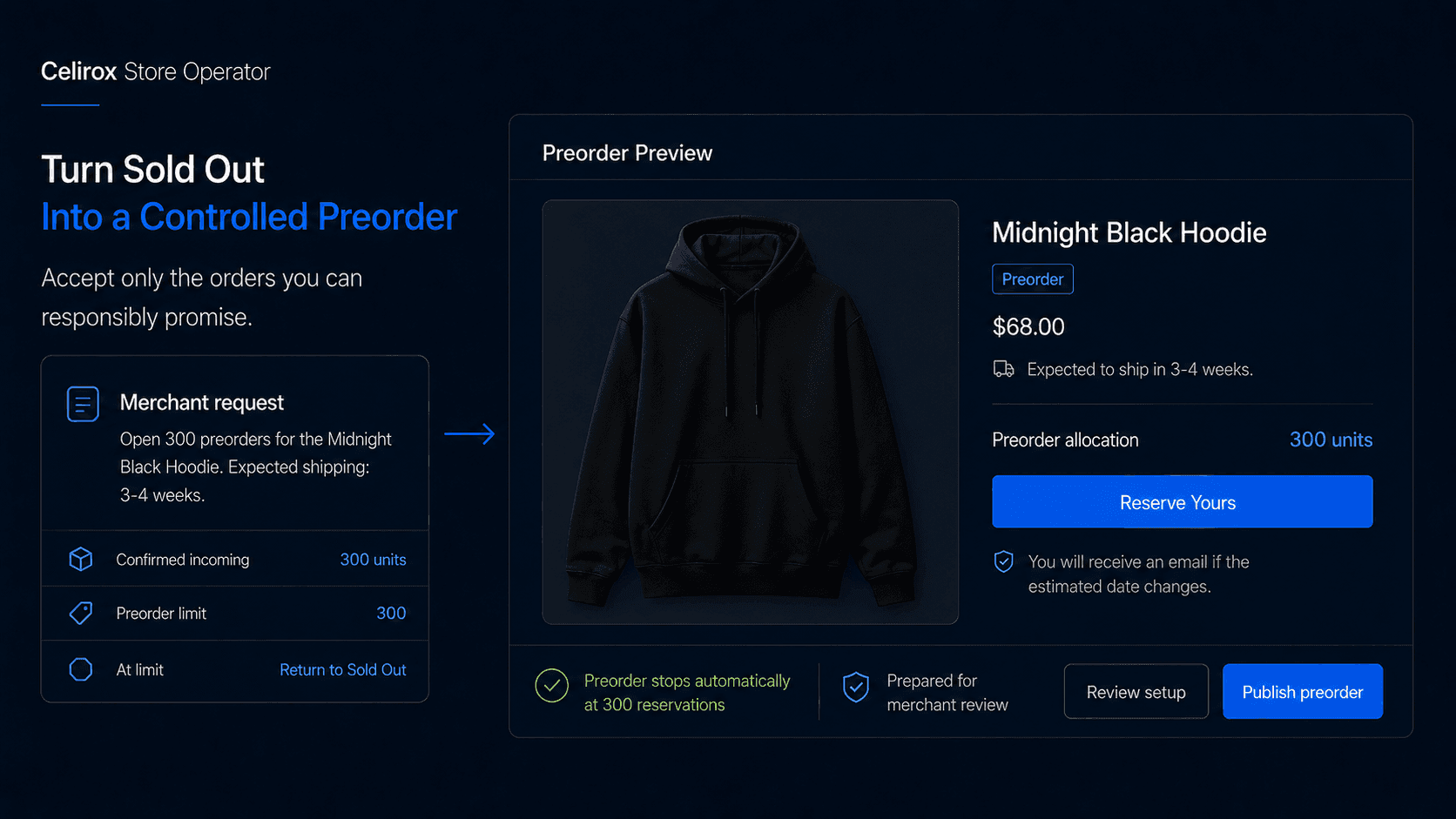
"The Midnight Black Hoodie is sold out, but we have 300 units arriving in four weeks. Open preorders for those 300 units, show customers that it ships in approximately four weeks, label the offer 'Reserve Yours,' and keep preorder orders easy for our team to identify."
The workflow can become:
Identify product → Check preorder conditions → Set allocation → Configure customer message → Prepare store setup → Merchant reviews → Publish
The merchant still decides what should happen.
Store Operator helps reduce the work required to translate that decision into store configuration.
The same request can include additional rules.
For example:
"Stop accepting preorders after 300 units, and return the product to sold out until the next allocation is confirmed."
That turns the preorder into a controlled inventory process instead of unlimited selling below zero.
Tell Customers the Truth
One of the easiest ways to create frustration is making a preorder look identical to an in-stock purchase.
Customers should understand the situation before paying.
Useful information can include:
- That the item is a preorder
- Expected shipping or availability window
- Whether in-stock items may ship separately
- What happens if the date changes
- How the customer will receive updates
The message does not need to be complicated.
For example:
Preorder - Expected to ship in approximately 3-4 weeks. We'll email you if the estimated date changes.
That is far better than showing a normal Buy Now experience and explaining the delay only after someone contacts support.
Transparency matters more than making the preorder visually identical to a normal purchase.
A shopper may be perfectly comfortable waiting four weeks.
They are much less likely to be comfortable discovering the wait unexpectedly.
Handle Mixed Carts Carefully
Mixed carts deserve special attention.
Imagine an order contains:
In-stock T-shirt
and:
Preorder hoodie
The customer may expect the T-shirt immediately and the hoodie later.
But the actual behavior depends on how the store's shipping and fulfillment processes are configured.
Before launching the preorder, determine whether available products will ship immediately, whether the entire order will wait, whether separate shipments create additional costs, and whether the warehouse can clearly identify delayed items.
This is not just a storefront question.
It affects fulfillment.
A successful preorder setup should work all the way through:
Customer places order → Preorder identified → Fulfillment understands delay → Available inventory handled correctly → Preorder ships when ready
There is little value in collecting preorder demand if the warehouse has no clear way to process the resulting orders.
Communicate When Dates Change
Supplier delays are where preorder trust is tested.
Imagine the product originally says:
Ships in 3-4 weeks
Then the supplier says production will take another two weeks.
Ignoring the change is the worst option.
A better process is:
Update estimate → Identify affected customers → Explain delay → Give revised timeline → Provide support path
With Store Operator, a merchant could say:
"Update the Midnight Hoodie preorder estimate from four weeks to six weeks and prepare an update for customers who already ordered it."
The useful part is communicating before customers have to ask:
"Where is my order?"
A delay does not automatically create a bad preorder experience.
A surprise delay often does.
Customers are more likely to understand uncertainty when the merchant explains it clearly and early.
Use Preorders as Demand Signals
Preorders can tell merchants more than how much revenue was collected before stock arrived.
Suppose you planned to accept 300 reservations over three weeks.
They sell out in two days.
That is a meaningful demand signal.
It may influence future purchase quantities, production planning, marketing spend, variant allocation, and restock priorities.
The opposite result is useful too.
If only 20 customers reserve a product that you expected to sell quickly, the merchant has learned something before committing to another large order.
Preorders can therefore help answer:
How much real purchase intent exists before the next inventory decision?
That is stronger than relying only on page views, likes, or waitlist interest because the customer has made an actual purchase commitment.
Still, demand planning should consider cancellations and refunds as well.
A preorder is a useful signal, not perfect forecasting.
Measure More Than Revenue
Preorder revenue matters, but it should not be the only metric.
Useful measurements include:
- Preorder units sold
- Cancellation rate
- Refund requests
- Customer support questions
- Promised vs actual fulfillment date
- Percentage of incoming inventory already reserved
The quality of the preorder experience matters as much as the number of reservations.
Imagine sales look strong, but customer support becomes overwhelmed because buyers did not understand when the product would ship.
That is not a clean success.
Likewise, a campaign that accepts more orders than the incoming shipment can fulfill may temporarily show higher revenue while creating future cancellations and refunds.
The useful question is:
Did we capture demand without promising more than we could deliver?
That is a better standard than simply maximizing preorder volume.
Frequently Asked Questions
Can Shopify stores sell products before they are back in stock?
Yes. Shopify stores can support preorder experiences where the merchant's configuration and chosen implementation allow customers to purchase products before normal inventory is available.
Should every sold-out product become a preorder?
No. Preorders are most useful when incoming inventory and fulfillment timing are reasonably clear. If future availability is uncertain, a waitlist or back-in-stock notification may be better.
How many preorders should I accept?
Base the limit on inventory you reasonably expect to have available after accounting for other allocations, safety buffers, and operational uncertainty.
What should customers see on a preorder product?
Clearly state that the item is a preorder and provide a realistic shipping or availability window. Customers should understand the delay before purchasing.
What happens if the supplier is delayed?
Update the customer-facing estimate and communicate with existing preorder customers as early as possible. Do not wait for them to contact support first.
Can preorder products exist with normal in-stock products in one order?
Yes, but mixed-cart fulfillment needs careful testing so customers and fulfillment teams understand whether items will ship together or separately.
Can Celirox Store Operator help manage preorders?
Yes. Merchants can describe the product, incoming quantity, preorder limit, timeline, messaging, and related rules in plain English, and Store Operator can help prepare and manage the corresponding store setup.
Promise Only What You Have
When a product sells out, there are really two questions.
Do customers still want it?
And more importantly:
Can we responsibly promise more?
If the answer to both is yes, a preorder can keep buying intent alive while the next shipment is on its way.
But the strongest preorder campaign is not the one that accepts the largest number of orders.
It is the one where the customer understands what they are purchasing, the merchant knows how many units can safely be promised, and the fulfillment team knows what should happen afterward.
Confirm inventory → Set limit → Explain timeline → Accept reservations → Communicate changes → Fulfill
Celirox Store Operator helps merchants turn those decisions into a controlled Shopify preorder process without requiring every rule and storefront change to be configured manually.