The Project Is Finished. Why Does the Handoff Still Take an Hour?
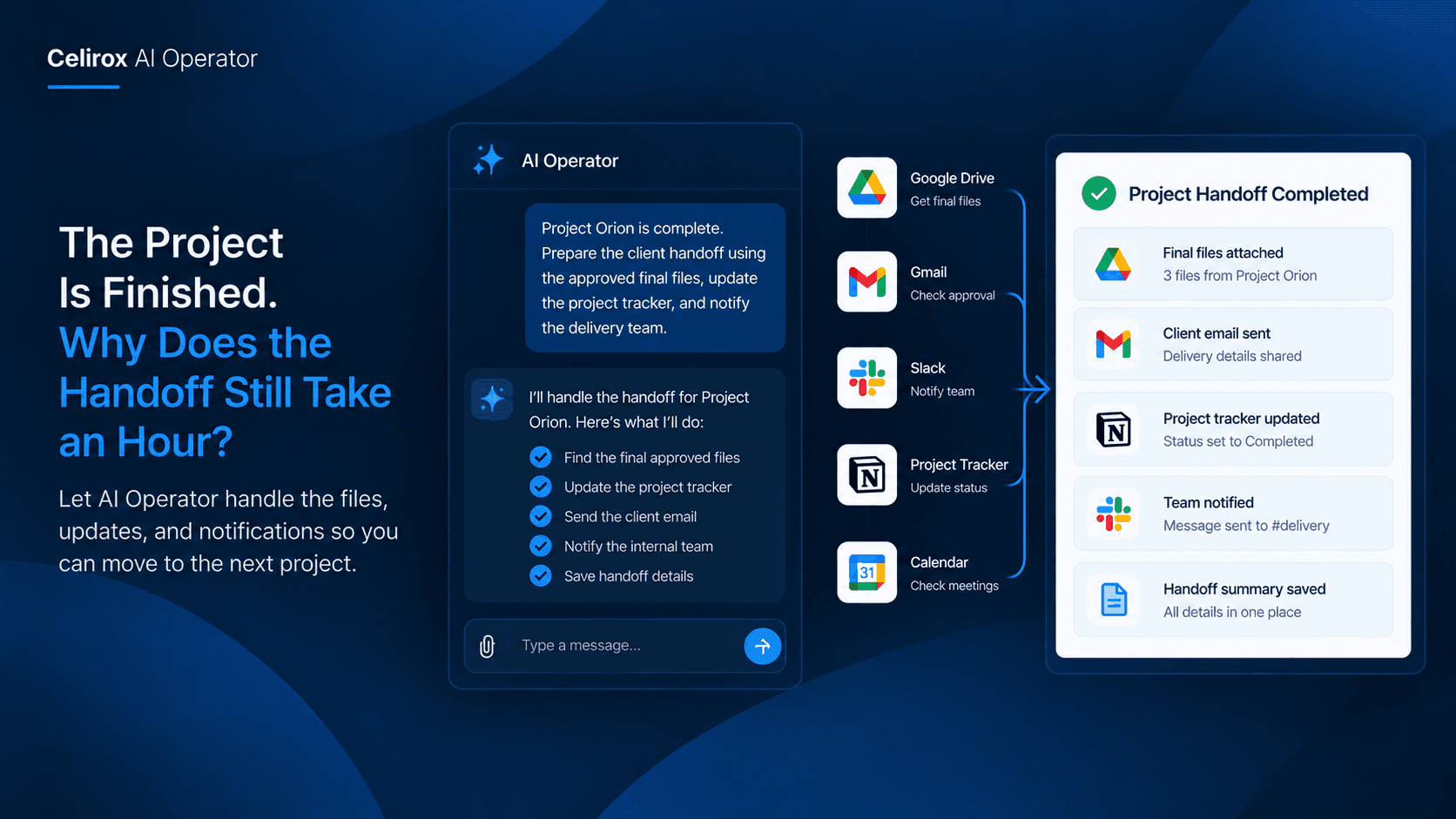
The project is finished.
The client has approved the final work.
The files are ready.
Everyone on the team is ready to move on to the next project.
Except the person responsible for closing everything out.
They still need to find the final files, make sure they are actually the approved versions, update the project tracker, send the client email, notify the internal team, and make sure important project information is stored where someone can find it later.
None of that is the actual project work.
But it can easily take another hour.
And when a team finishes several projects every week, that hour becomes a recurring part of the workload.
The project is complete.
The handoff is not.
Finishing Work Creates More Work
Consider a small agency managing several client projects at once.
One project reaches completion on Thursday afternoon. The designer has finished the final assets, the account manager has received approval, and the project manager marks the work as complete.
That should be the end of the project.
Instead, the project manager starts opening different tools.
They search Google Drive for the final deliverables. They check Slack to confirm which version the client approved. They open the project tracker and change the status. Then they write an email to the client and send another message to the internal team.
Finally, they look through the project notes to make sure nothing important was missed.
The project itself may have taken two weeks.
The handoff can take another hour.
The frustrating part is that this is not a one-time problem. The same sequence happens every time another project reaches the finish line.
The Information Is Already There
The person handling the handoff usually isn't creating new information.
The information already exists somewhere.
The final documents may be in Google Drive. The approval may be in Gmail. The latest conversation may be in Slack. The project status may be recorded in a spreadsheet or another workplace system.
The problem is that nobody wants to manually connect all of those pieces every time.
Someone has to remember where the information lives, find the relevant details, decide what is actually final, and then turn everything into a clean handoff.
That is what makes the process frustrating.
The business already has the information.
The employee is simply spending time moving it between places.
Context Is What Takes Time
Imagine a project manager says:
"Project Orion is complete."
That sounds like a simple statement.
But completing the handoff raises several questions.
Which files are final?
Who approved them?
Where should the project status be updated?
Who needs to be notified?
What should the client receive?
Does the team need to know about any remaining follow-up?
A simple automation might handle one predefined action.
For example, it could move a file from one folder to another.
But a real project handoff is rarely just one action.
The person completing the handoff has to understand the situation before deciding what should happen next.
That is where AI Operator can be useful.
Instead of making the employee collect every piece of information first, it can work with the context available across the connected workplace tools and help coordinate the steps around the completed project.
One Completion Can Start Everything
The workflow can begin with something very simple:
The project is complete.
From there, the handoff can follow a consistent process.
The relevant project information can be gathered, the final material can be identified, the appropriate communication can be prepared, the project record can be updated, and the people who need to know can be notified.
For example, a project manager might ask:
"Project Orion is complete. Prepare the client handoff using the approved final files, update our project tracker, and notify the delivery team."
That is how a person naturally describes the job.
They don't want to explain every click.
They don't want to say:
"Open Drive, search this folder, find this document, open the tracker, change this field, open Gmail, write this email, then message the team in Slack."
They care about the outcome.
The tools are simply where the work happens.
Finding The Right File Matters
One of the easiest mistakes during a project handoff is sending the wrong version.
A busy project folder can contain files such as:
Client-Website-Final
Client-Website-Final-v2
Client-Website-Final-Approved
Client-Website-Final-Approved-NEW
When a project has been running for several weeks, finding the correct file can become surprisingly difficult.
The newest file is not necessarily the approved file.
The file with "final" in its name is not necessarily the one the client signed off on.
A proper handoff therefore needs context.
Was the file referenced in the latest client email?
Was it part of the final approval?
Is it stored in the expected project folder?
Does the project status indicate that the work is actually complete?
Those details matter because a handoff is not simply about finding a file.
It is about finding the right file.
Keep Project Records Current
Project trackers are another small responsibility that becomes expensive through repetition.
A team might track projects using a spreadsheet with information such as:
Project → Client → Owner → Status → Completion Date → Next Action
When a project is completed, someone needs to update that information.
If the update happens immediately, everyone has a clearer picture of the company's current workload.
If it gets forgotten, the tracker starts telling an outdated story.
A project might still appear as "In Progress" even though the client has already approved the final work.
Someone could then ask the team for an unnecessary status update. A manager could include the project in a report as an active project. Another employee could assume work is still outstanding.
Keeping the record current may take less than a minute.
Remembering to do it every time is the harder part.
Tell People What They Need
The handoff also involves communication.
But not everyone needs the same message.
The client may need the final deliverables and a short explanation that the project is complete.
The account manager may need confirmation that the delivery happened.
The internal team may only need to know that the project is officially closed.
A manager may need the completed project reflected in their reporting.
Sending one generic message to everyone isn't always helpful.
The better approach is to give each person the information relevant to them.
For example, the internal team might only need:
Project complete. Final files delivered. No further delivery work required.
The project manager may need more context:
Project complete. Client approved the final delivery on Thursday. Final files are stored in the project folder and the tracker has been updated.
The point is not to send more messages.
It is to make sure the right information reaches the right people without someone having to manually recreate the same context every time.
Make Handoffs Repeatable
The real benefit becomes obvious when a company completes projects regularly.
Imagine an agency finishes ten projects in a month.
Without a consistent process, every project manager may handle the final handoff differently.
One person updates the tracker immediately.
Another does it at the end of the day.
One sends a detailed client email.
Another sends a two-line message.
One organizes the final files carefully.
Another leaves them inside an old project conversation.
The work may still get completed, but the process becomes inconsistent.
A repeatable workflow gives the team a common operating pattern:
Project complete → Gather context → Prepare handoff → Update records → Notify people
The exact applications can differ from company to company.
The important part is having a process that does not depend entirely on one person's memory.
When the same work happens every week, consistency becomes just as valuable as speed.
Keep People In Control
Automating a handoff does not mean handing every decision to software.
Some projects will have exceptions.
A client may have requested something unusual. A sensitive document may need to be reviewed before it is shared. A project may technically be complete but still have one unresolved issue.
Those situations deserve human attention.
AI Operator can be useful by handling the preparation around the decision instead of pretending the decision does not exist.
The employee can review the important information, make the final call, and step in when something looks unusual.
That changes the job from:
"I need to perform every step manually."
to:
"I need to review the parts that actually require my judgment."
That is a much better use of time for a project manager.
Stop Repeating The Handoff
A completed project should create momentum for the team.
Instead, many companies lose another hour to administrative cleanup before everyone can move on.
The individual tasks are not difficult.
Finding a file is not difficult.
Updating a spreadsheet is not difficult.
Sending an email is not difficult.
The problem is doing all of them together, across different tools, for every project, while making sure nothing gets forgotten.
AI Operator can help turn that repetitive coordination into a more consistent workplace process.
A project manager can start with the outcome:
"This project is finished. Take care of the handoff."
The surrounding work can then be organized around that request.
The final project information can be gathered, records can be updated, communication can be prepared, and the relevant people can be informed.
The project manager still owns the client relationship.
The team still owns the quality of the work.
The AI simply helps remove the repetitive work sitting between finished and fully handed off.
And when that happens dozens of times throughout the year, the time saved is no longer a small convenience.
It becomes a better way for the team to finish work.
Frequently Asked Questions
What is a project handoff?
A project handoff is the process of closing a completed project and making sure the final files, project records, client communication, and internal updates are all handled properly.
Why does project handoff take so much time?
The information needed for a handoff is often spread across several workplace tools. Someone has to find the right files, check the latest communication, update records, and notify the appropriate people.
Can AI Operator handle the entire project handoff automatically?
The workflow depends on how the business defines the process and the connected workplace tools available. AI Operator can help coordinate the repetitive steps, while people can remain involved where review or approval is needed.
Can it find the final project files?
AI Operator can work with information available through connected workplace applications. The workflow should still be designed around the way the company stores and identifies final project materials.
Why is context important for a project handoff?
The newest file is not always the approved file, and the latest project message may contain information that changes what should happen next. Context helps determine which information actually belongs to the completed project.
Can the project tracker be updated as part of the handoff?
If the relevant project-tracking system is connected and supported, updating the project record can be included as part of the workflow rather than being left as a separate manual task.
Does automating the handoff remove human review?
Not necessarily. Teams can keep people involved when a project contains sensitive information, unusual client requirements, or decisions that require human judgment.
Is this useful for small teams?
Yes. A small team may actually feel repetitive handoff work more because the same person often manages the client communication, project records, files, and internal coordination.
What is the biggest benefit of automating project handoffs?
The biggest benefit is reducing the amount of repetitive coordination required after the actual work is finished, while keeping the team focused on decisions and work that genuinely require their attention.
How should a team start?
Start with one repeated handoff process. Define what should happen when a project is completed, identify which tools contain the required information, and decide which steps can be handled automatically and which should remain under human review.