The Customer Cancelled. Why Are Five Systems Still Treating Them Like a Customer?
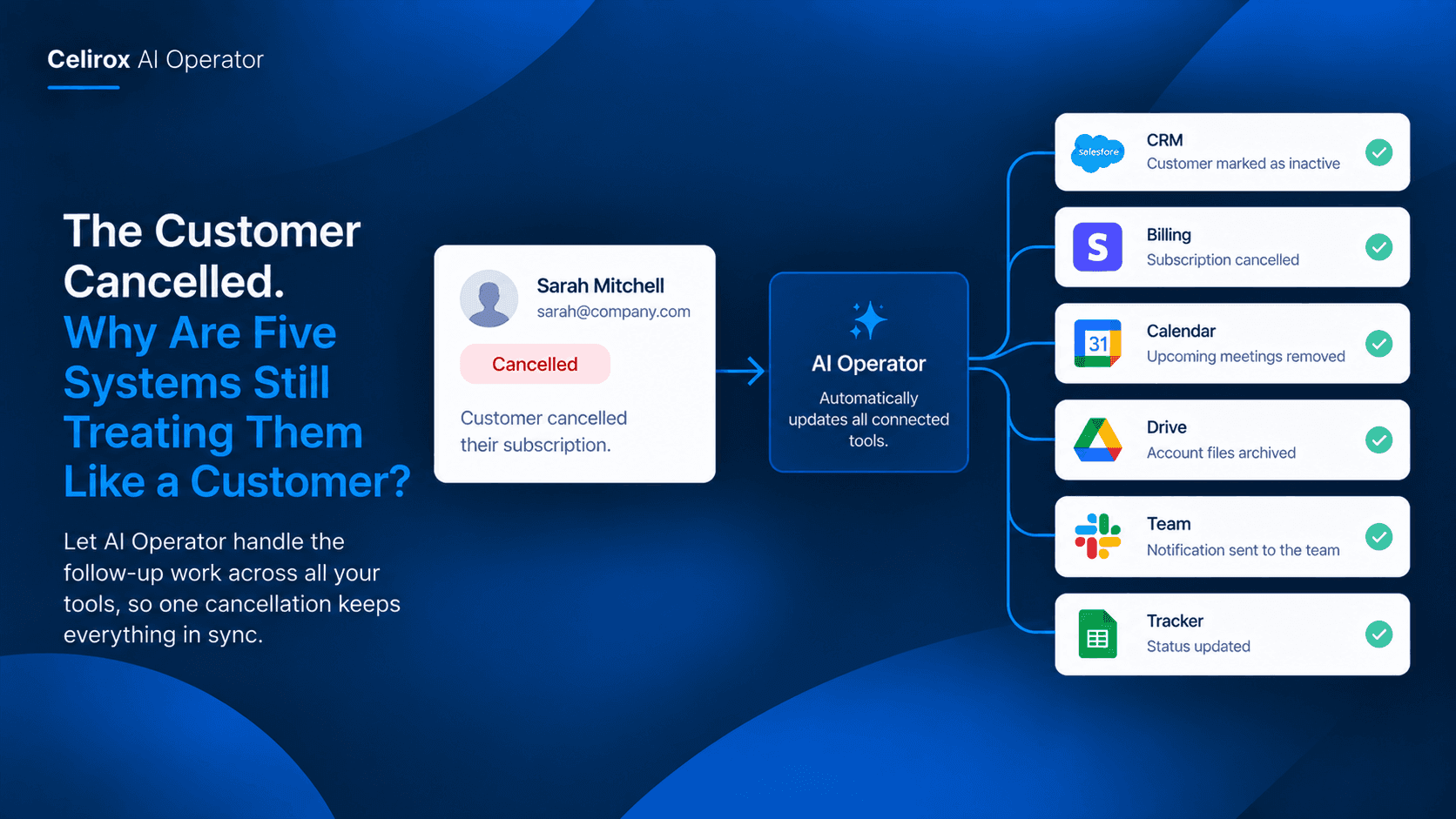
The customer cancelled on Tuesday.
The account manager saw the message.
They updated the CRM.
Then came the rest.
Someone needed to check billing.
Someone else needed to update the customer tracker.
The upcoming meeting had to be removed.
The project files were still sitting in the shared Drive.
And the team working on the account still needed to know that the customer was no longer active.
The cancellation itself took a minute.
Cleaning everything up took much longer.
One Decision Creates Many Jobs
Businesses often think about cancellation as one event.
From an operational point of view, it is rarely one task.
A customer's status changes.
That change can affect billing, schedules, files, internal records, and the people responsible for the account.
None of those individual tasks is especially difficult.
The problem is that they live in different places.
The CRM knows about the customer.
The calendar knows about upcoming meetings.
The shared Drive contains the account files.
A spreadsheet may contain internal tracking information.
Slack or another team communication tool is where people coordinate the work.
The cancellation creates work across all of them.
The First Update Is Usually Easy
Someone normally updates the main customer record first.
That part is obvious.
The customer is no longer active, so the CRM gets changed.
But then the employee has to remember everything else.
Did billing stop?
Are there future meetings?
Does the project tracker need updating?
Should the account folder be archived?
Does the account manager need to tell another team?
What happens to the open work?
This is where operational mistakes happen.
Not because people do not know what to do.
Because there are too many small things to remember.
People Build Checklists For A Reason
When a business experiences enough cancellations, someone eventually creates a checklist.
Update CRM.
Check billing.
Cancel meetings.
Update tracker.
Notify team.
Archive files.
That checklist helps.
But it also reveals the underlying problem.
The company has turned a predictable business event into a manual procedure.
Every time another customer cancels, someone works through the same list again.
The checklist becomes a safety net for a process that is repeated often enough to deserve automation.
The Customer Should Not Stay Active
Imagine the CRM says a customer has cancelled.
But a recurring meeting is still on the account manager's calendar.
The project folder is still marked active.
The internal tracker still shows an active customer.
A teammate sees the customer listed as active and starts working on something that no longer needs to happen.
Now the business has inconsistent information.
One system says one thing.
Another system says something else.
A third system still assumes the old situation.
That creates confusion that did not exist when the customer was active.
The cancellation needs to travel through the business.
Connect The Consequences
This is where AI Operator can approach the problem differently from a simple one-step automation.
The useful starting point is not:
"When an email arrives, send a Slack message."
It is:
"When this business event happens, what else needs to change?"
That question produces a much more useful workflow.
A cancellation can become the starting point for a sequence of actions across the tools the business already uses.
For example:
Customer status changes → update the relevant business record → check related work → update internal tracking → handle scheduled items → organize the account workspace → tell the people who need to know.
The exact steps depend on how the company operates.
The principle stays the same.
One decision should not require five people to remember five separate tasks.
Do Not Treat Every Cancellation The Same
A good workflow also needs room for exceptions.
Not every customer relationship is identical.
One customer may have an active project.
Another may have no upcoming work.
A third may have a scheduled meeting next week.
Another may require a final internal review before the account is closed.
That means the workflow should not blindly perform every possible action every time.
The business rules matter.
If there is an active project, handle it.
If there are future meetings, review them.
If there is no remaining work, the process can move straight to closure.
The important part is that the workflow can account for the situation instead of forcing employees to start from scratch every time.
Keep Important Information Together
Customer cancellation also creates a documentation problem.
After the customer leaves, the business may still need access to their previous work.
Contracts.
Project files.
Deliverables.
Notes.
Historical information.
The answer is not necessarily to delete everything.
Often, the useful action is to move the account from active work into an appropriate archive or inactive state.
That makes the workspace easier to manage without losing information the business may need later.
Again, this is a small administrative action.
But when it happens repeatedly, it becomes another job for someone to remember.
Give The Team A Clear Ending
There is also a human side to closing an account.
People should not have to discover a cancellation accidentally.
Imagine a support employee opens the CRM and sees that a customer is gone.
Or a project manager finds out because a meeting disappeared from their calendar.
Or someone opens the project folder and realizes the account was closed yesterday.
That creates uncertainty.
A simple internal update can close the loop:
"Acme account closed. Billing has been reviewed, upcoming meetings handled, and project files moved to the inactive account folder."
Now the team knows what happened.
More importantly, they know the operational work has been handled.
Build Around The Business Event
The most useful way to think about this workflow is not application by application.
Start with the business event.
A customer cancelled.
Then ask:
What should happen because of that?
That may involve several applications.
The CRM needs the new status.
The calendar may need attention.
The internal tracker may need updating.
The Drive workspace may need reorganizing.
The team may need to be informed.
A workflow that understands the event can coordinate those actions instead of forcing employees to manually connect them every time.
That is where an AI Operator becomes more useful than a collection of isolated automations.
Let People Handle Exceptions
Automation does not need to make every decision by itself.
Some cancellation cases are straightforward.
Others need a person.
Maybe there is an outstanding invoice.
Maybe the customer has an active dispute.
Maybe a project is almost complete.
Maybe there is a contractual requirement that needs review.
Those cases should be surfaced rather than silently pushed through the normal process.
AI Operator can be used to coordinate routine work while keeping people involved when a situation requires judgment.
That gives the team a better balance.
Routine steps happen automatically.
Exceptions get human attention.
Make Closing An Account A Process
A customer cancellation should not be the moment when everyone starts asking:
"What do we do now?"
The process should already be clear.
The customer leaves.
The business records the change.
Related systems are updated.
Active work is handled.
Files are organized.
The relevant people know.
The account reaches a clean endpoint.
That is what a good operational workflow provides.
It takes something that used to be a loose collection of reminders and turns it into a repeatable process.
FAQ
Can AI Operator coordinate workflows across multiple applications?
Yes. AI Operator is designed for business workflows that can involve connected applications rather than limiting an automation to one application or one simple action.
Why is customer cancellation a good automation use case?
Because a cancellation often creates several predictable follow-up tasks. The CRM, billing process, calendar, internal tracking, files, and team communication may all need attention.
Does every cancellation need the same workflow?
Not necessarily. Different customers can have different active work or account conditions. A useful workflow should account for relevant conditions and surface exceptions when human judgment is needed.
Can the workflow update the CRM?
AI Operator is designed to work with connected business applications, but the exact CRM actions depend on the integrations and permissions available in the setup.
What happens to customer files after cancellation?
That depends on the company's retention and operational policies. A workflow can help organize an account into an inactive or archived state rather than leaving active work mixed with closed accounts.
Is the goal to automate the entire cancellation process?
The goal is to automate the predictable operational work around the event. Sensitive decisions, unusual cases, or actions requiring human judgment can remain with the appropriate person.
One Cancellation Should Not Become Five Tasks
A customer deciding to leave is already a significant business event.
Your team should not have to turn that event into a scavenger hunt across five different applications.
The CRM should reflect the customer's status.
The related work should be handled.
The calendar should not keep pretending the relationship is active.
The files should have a clear home.
And the people responsible for the account should know what happened.
None of those tasks is complicated on its own.
The problem is remembering all of them, every time.
AI Operator can help businesses connect those pieces around the actual event instead of building another isolated automation for every individual action.
That is a more useful way to think about workplace automation.
Do not ask only, "What can I automate in this app?"
Ask:
"When this happens in my business, what else should happen?"
That question can uncover some of the most valuable automation opportunities in everyday operations.
When a customer leaves, your systems should know what that means — not just record that it happened.