The Patient Cancelled. But The Clinic Still Has An Empty Slot.
It is 10:30 in the morning.
A patient calls the clinic and says they cannot make their 4 PM appointment.
Reception notes the cancellation.
But the work does not stop there.
The appointment still needs to be reflected correctly in the clinic's calendar and records. Someone also needs to know that the 4 PM slot is now available.
A simple cancellation can create several small administrative tasks.
One Cancellation Changes Several Things
The patient has cancelled one appointment.
But the clinic may now need to:
- Update the appointment status
- Free the calendar slot
- Keep the patient record accurate
- Tell reception about the available slot
- Give the team an opportunity to rebook someone else
None of these actions is particularly difficult.
The problem is remembering every step every time a cancellation happens.
The Empty Slot Matters
An appointment cancellation is not only a schedule change.
It creates an opportunity.
If the clinic can identify the newly available slot quickly, reception may be able to offer it to another patient who is waiting for an appointment.
If nobody notices, the slot can simply remain empty.
For a clinic with a busy schedule, repeatedly losing those available appointment windows can matter.
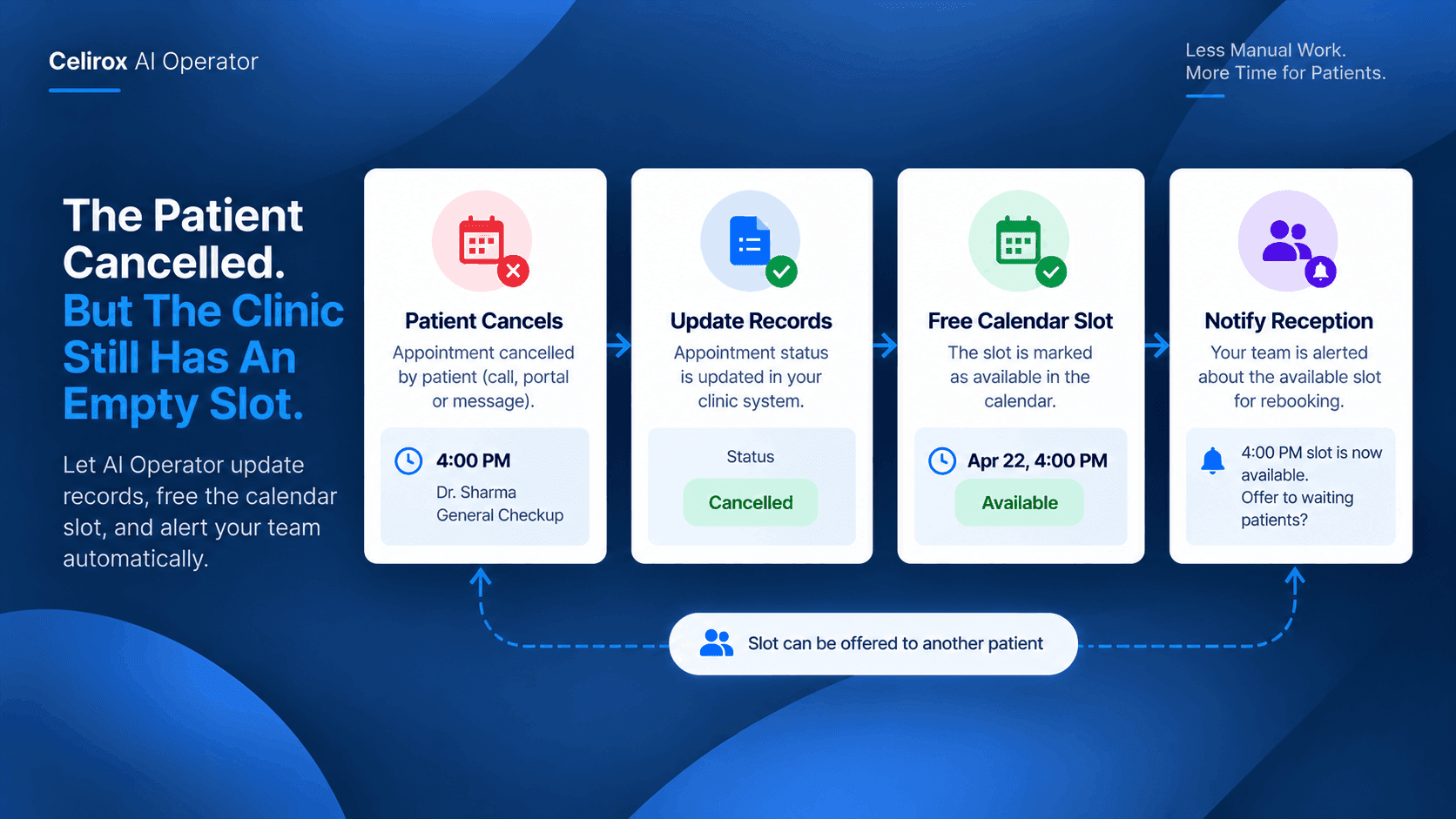
Let One Event Start The Workflow
The useful starting point is the cancellation itself.
Once the appointment is cancelled, the rest of the workflow can follow.
For example:
Patient cancels
↓
Appointment record updated
↓
Calendar slot becomes available
↓
Reception is informed
↓
Slot can be offered again
Instead of asking a staff member to coordinate each step manually, AI Operator can connect the relevant applications and actions into one workflow.
Keep The Calendar Accurate
The calendar is one of the most important sources of information for a clinic.
If a cancelled appointment remains on the schedule, reception may think the time is unavailable.
That can lead to missed opportunities to book another patient.
Keeping the calendar updated after a cancellation means the team can see the actual availability rather than relying on an old appointment status.
Tell The Right Person
Updating the calendar is useful.
But someone still needs to know what changed.
The receptionist or scheduling team may be responsible for filling open appointments.
An AI Operator workflow can pass the relevant information to the appropriate team member or connected system.
For example:
4:00 PM appointment cancelled
Doctor: Dr. Sharma
Status: Available
Action: Slot can be offered to another patient
The team does not need to discover the change themselves.
Keep Patient Records Consistent
A cancellation should not leave conflicting information across systems.
The appointment may exist in a scheduling tool while the patient record or another connected system still shows the original appointment as active.
When the relevant applications are connected, AI Operator can coordinate the updates required by the clinic's workflow.
That helps keep the information surrounding the appointment aligned.
Give The Slot Another Chance
Consider a clinic with a waiting list.
A patient cancels a 4 PM appointment.
Reception now has a choice.
They can contact someone who has been waiting and offer the newly available time.
The faster the cancellation reaches the person managing appointments, the more useful that opportunity becomes.
The goal is not to guarantee that the slot will be filled.
The goal is to make sure the clinic knows the slot exists.
Make Cancellation Less Manual
Without a connected workflow, reception may have to remember:
"Cancel it in the calendar."
"Update the patient record."
"Tell the scheduling team."
"Check whether someone else can take the slot."
These small tasks happen repeatedly.
AI Operator can coordinate the sequence so the cancellation becomes the trigger for the administrative work that follows.
Start With One Appointment Flow
A clinic does not need to automate every scheduling process at once.
Start with cancellations.
A simple workflow could be:
Event: Appointment cancelled
Calendar: Update availability
Record: Update appointment status
Team: Inform reception
Next step: Offer the open slot when appropriate
The exact applications and actions can depend on how the clinic already manages appointments.
Keep Staff Focused On Patients
Reception teams already handle calls, patient questions, scheduling, and other daily requests.
They should not have to spend unnecessary time moving the same cancellation information between systems.
Automating the administrative chain gives the team a cleaner process.
The clinic still decides what happens with the newly available slot.
AI Operator simply helps make sure the information reaches the right places.
Common Questions
Can AI Operator handle appointment cancellations?
AI Operator can coordinate connected workflows triggered by business events such as a cancellation, provided the relevant scheduling and business applications are connected and the required actions are configured.
Can the calendar be updated automatically?
If the clinic's calendar or scheduling system is connected and supports the required action, the workflow can update the relevant appointment information.
Can reception be notified about the open slot?
Yes. A connected workflow can communicate the relevant change to the appropriate team or system according to the clinic's configured process.
Does this automatically book another patient?
Not necessarily. The purpose of this workflow is to make the newly available slot visible and actionable. The clinic can decide whether and how to fill it.
Turn A Cancellation Into An Opportunity
A cancelled appointment is easy to think about as a lost booking.
But for a busy clinic, it also creates an open time that may be useful to another patient.
The important thing is making that change visible quickly and keeping the clinic's systems consistent.
AI Operator can coordinate what happens after the cancellation:
Cancellation → records updated → calendar updated → reception informed → slot available for rebooking.
The clinic still makes the scheduling decision.
The repetitive coordination simply does not have to depend on someone remembering every step.
Try Celirox AI Operator
Connect the tools your clinic already uses and turn repetitive administrative workflows into coordinated AI-powered processes.